Showing posts with label TraqStudio. Show all posts

March 26, 2010

Traqmate 3.0 software released and, it's free!

No comments:


Heads up tracktards, 3.0 versions of the Traqmate software packages (Traqstudio and Traqview) are out and available for free download.

There are a number of improvements, most notable for Traqstudio users, the addition of LANC control allowing convenient automatic control of Sony HD camcorders. This will require the purchase of the new TraqDataHD interface. You also get upgraded dash controls and configurations as well as assorted other function.

Details and download links are available after the jump.


The easiest data analysis, data/video player, and video editor just got even better.

TRAQSTUDIO 3.0
Enhanced Features
Optional Friction Circle Cursor Trails
Optional Friction Circle Vector display
Updated graphical video dash
-Classic/solo/full dash versions
-Sizable
-Transparent
Better support for GoPro video (non HD) and other cameras using MJPEG format
Single or separate distance cursors
Video files optionally renamed to match the session file
Templates to save program default setups (ie lap selection mode, open graphs/forms)
Lap selection for 'all' drivers
Time/distance graphs 'collapsed' on setup screen
New auto-segment methods
Rules for opening previously named video files when a session is opened
Search for video files
Search for session/analysis files
Right click options
Improved Video Creation (SD only)
-DashPaq Gauges
-Selectable full or tach only
-Transparency
-Sizable
-Location options
-Pre/post roll function
Improved handling of smaller (less than 640x480) video input files. When a smaller format is detected (like those produced by the GoPro camera) the frames are resized to a larger intermediate size, graphic overlay applied, and resized to the final output.
Improved traqmate basic data transfer
Improved graph range limits

Click link below to download FREE update.
TraqStudioSetupV3.00.exe

TRAQVIEW 3.0
The easiest data analysis tool just got easier and more powerful.

Enhanced Features
Optional Friction Circle Cursor Trails
Optional Friction Circle Vector display
Single or separate distance cursors
Templates to save program default setups (ie lap selection mode, open graphs/forms)
Lap selection for 'all' drivers
Time/distance graphs 'collapsed' on setup screen
New auto-segment methods
Search for session/analysis files
Right click options
Improved traqmate basic data transfer
Improved graph range limits

Click link below to download FREE update.
http://www.traqmate.com/downloads/traqview/TraqviewSetupReleaseV3.00.exe

New Traqmate Firmware 3.00

Enhanced Features
Data recovery feature that will salvage data lost due to power interruption
Support for new TraqData HD interface with HD cameras
Faster GPS lock
Traqmate Complete Firmware
How To Update your Traqmate Complete
http://www.traqmate.com/downloads/tmrelease300/dsu.tqc
http://www.traqmate.com/downloads/tmrelease300/du.tqc


Traqmate Basic Firmware
How To Update your Traqmate Basic
http://www.traqmate.com/downloads/tmrelease300/ssu.tqc

About Traqmate

Traqmate is a line of GPS Data Acquisition and Video products for high performance and racing vehicles developed and marketed by Track Systems Technologies, LLC. The Traqmate product was introduced in 2005 and several thousand systems are in operation worldwide. For more information or a downloadable demonstration, visit www.traqmate.com.

Traqmate introduced industry innovations such as GPS predictive lap timing, track-map analysis, automatic data/video synchronization, and video theoretical best lap playback.
Traqmate Sales
Ron Hlozansky
877-289-0312
sales@traqmate.com
Traqmate Marketing
Glenn Stephens
877-289-0312
marketing@traqmate.com

January 24, 2010

Recording your passion: in-car camera roundup

3 comments:
What a great time for tracktard photo and videographers, there have never been better or more affordable tools to capture our passion. Check out this great clip shot with a still camera, a Canon 5D MkII. Creative possibilities have hugely expanded even in just the last year or so and after the jump we'll look at some of the best tools available to you.


Cool video right? It comes from Chean's Weblog via this other great page : Bulgogibrothers.com. Make sure you watch it full screen in HD to really see how good in car video can now be.


While some tracktards out there only want an onboard camera to have a record any incidents which might happen, the boundaries of what's possible, practical and affordable in terms of image quality have been radically shifted in the past year or so.

For a long time now the the gold standard for in-car video has been the ChaseCam system and for good reason. Compact, rugged, simple to use, the system was designed by car people for motorsport applications. But ChaseCam has an inherent flaw: it was designed for watching videos on a 4:3 televisions which means interlaced video. I don't think I'd be too off the mark if I said that 95% of all chase cam videos are watched on 16:9 computers screens today. Interlaced videos on computer screens simply don't look as good as progressive scan pictures from even a first generation GoPro camera, with all it's flaws.

The advent of inexpensive HD video has effectively rendered the first Chase Cam system obsolete in terms of image quality. Chase Cam has announced a new HD based recorder will be on the market this year and it will likely become the new standard. But there are a number of other solutions with great image quality available for al you "Motographers" out there.

GoPro updated their camera with impressive specs and some cool features: 1080P, 30 fps with a maximum 15Mbit/s data rate, the ability to do time lapse stills so, for example, you could make a video like this:


Personally I find the GoPro's ergonomics and the need for it to be in it's bulky case a bit frustrating and it does suffer from a bit of that dreaded "Rolling Shutter" artifact which makes it impossible to use so many CMOS based camcorders for in car footage (CCD camcorders don't have this problem but ...you can't find any now, HERE is an extreme example of the problem).

Here is a clip filmed with a GoPro HD


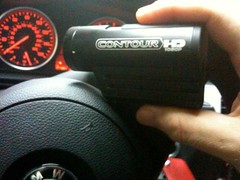
An alternative to the GoPro is a camera which has wide popularity with the extreme sports crowd, skiers, mountain bikers, base jumpers but for some reason not as popular yet with the four wheel motorsport set, the ContourHD1080p. Specs for the new ContourHD 1080p are comparable to the GoProHD but the ergonomics are in my opinion vastly superior. The design philosophy is to make a camera as simple to operate as possible. There is a power on/off button and a large record switch and you aim it with the aid of two built in lasers. All housed in a sleek metal water resistant housing...Done.

There is one hidden switch that allows the choice of two resolutions, preset via computer software. Via software you can also set the mic gain and the exposure as well a choice of three exposure metering modes, spot, center weighted and average. The ContourHD 1080P does a very good job in tricky lighting conditions (though it does get grainy in very low light), The video below was shot in the late afternoon with the sun low, you can see what a great job the camera does not only at picking a balanced exposure but also not freaking out with the changing lighting. (try fullscreen)


Another alternative is to use the video feature of many point and shoot cameras, results can be pretty good but these cameras are generally delicate and most don't have a wide enough field of view... this one was shot with a Canon PowerShot SD780IS


For the ultimate in quality and image control you can use a Canon SLR (Nikons have the wobbly rolling shutter issue) with its wide choice of lenses but of course, SLR's are expensive, heavy and relatively delicate and for a similar cost you might have a look at something like a Sony HXR-MC1 but frankly I think it's not worth the money, the Sony lacks crucial "pro" features such as external mic inputs for example while not providing a drastically better picture.

Of course both the Contour and the GoPro lack a remote start feature but they are $300. You could buy a SmartyCam for about $1000 it features a live data overlay and connection to AIM systems but the image quality is just OK and the data overlay has some sync problems. Convenient, especially if you already have AIM but Traqmate's TraqstudioHD produces a cleaner overlay and final result. (example HERE)


So, while we wait to see ChaseCam's second act, a number of simpler, lower priced alternatives have raised the bar very high. Best time ever for tracktardographers!.

Please share your thoughts, expertise and setup as reference.

December 13, 2009

Traqmate goes HD

No comments:
With HD cameras now relatively inexpensive, the days of interlaced 4x3 video are numbered. Traqmate is offering a new interface for automatic synchronization of LANC capable cam-corders, providing the same level of convenience now available when using a Chase Cam recorder.
Below is the press release and after the jump an example of a video in HD (downscaled to 1280x720) with the familiar Traqmate dials, check it out full screen.

Need a last minute stocking stuffer for your tracktard friends? I suggest a Shift-I shift light with free shipping for the holidays!

Traqmate Announces HD Video at PRI

Traqmate is looking forward to another successful PRI show in Orlando this year, December 10th through 12th. The Traqmate booth number is lucky 1313.
We have a new HD product offering, that combined with our present data acquisition technology, provides completely synchronized high quality data and video recording for those interested in preserving the ultimate record of their driving experience. The result is simply stunning video. Come by to see our HD video in action.


click image for hi-res actual screenshot


Here are the Details:
Synchronization is accomplished via a new TraqData LANC device that will plug into any camcorder with a LANC or Ctl-L interface which includes almost all Sony camcorders. We recommend the new HD units that record on solid-state MemoryStick Pro Flash media because they are vibration resistant and can be played back immediately with a card reader. TraqData LANC also provides 4 Analog, 2 Digital, and one RPM inputs.

Camera units tested include Sony HDR-TG1 and Sony HDR-CX100, both of which are full 1080 resolution, quite small, and commercially available for under $600. The Sony line ranges from $350 to over $1000 depending on quality and features and have 12V DC adapters for in-car use and LCD screens for aiming.

In February 2010, Traqmate will be offering TraqCam HD packages including everything required for true HD video playback. To play back in 1080 fullscreen, a reasonably powerful computer will be required. Minimum requirements will be published at release but a typical machine for Full HD would be:
Intel Core 2 Duo P7200 2.10GHz, 2MB L2 Cache, GB DDR3 Memory, 250GB Hard disk
Laptops with these minimum specs are available in the $600 – $900 range. Lower resolution 720P and 1080 in a less-than-fullscreen window require less horsepower.
For rugged applications or where a bullet cam is preferable, Traqmate will continue to sell and support the ChaseCam line of standard definition cameras and recorders with our TraqSync and TraqData II interface modules.


April 2, 2009

nRelate Posts Only